
These 5 Apps Are the Key to an Organized Home (Always Find What You Need!)

Take it from me: By the time most people realize they need a home inventory app, it’s too late. If you’re new to the concept, a home inventory is a simple-enough (if not daunting) concept. A home inventory is simply a list or record of all of your personal possessions and how much they are worth. It’ll come in handy when unexpected near disasters, like a burst water pipe in a basement apartment, happen out of nowhere. Having an inventory of all of your items, and how much they cost, will save you tons of headaches down the line.
The last thing you want to do after disaster strikes — be it a burst water pipe, or a fire, or a climate-related event — is try to get a sense of how much all your stuff was worth before it got ruined.
Why You Should Make a Home Inventory
The first best time to do a home inventory was yesterday. The second best time to do a home inventory is now. According to the Insurance Information Institute, making a home inventory can help you purchase the correct amount of insurance, simplify filing a claim after a disaster, and substantiate property losses for tax purposes. As a renter, you can also always rely on a home inventory to have accurate renters insurance as well.
The Best Home Inventory Apps
Making a home inventory seems like a gargantuan task, until you realize that there are now apps and software that make it so much easier to take stock of everything you have in your home. Sometimes called “asset tracking software,” home inventory apps range from simple categorized lists to powerful tools that manage personal and small business inventories. The following are five of the best apps for making a home inventory, and their pros and cons.
For me, the most important items in my home are my books, and I was intrigued about how the apps and software could help me take inventory of my library. A lot of these apps appear to be designed for small business, which explains the costs, but most of them have a free trial or a free version that allow for a certain number of items to be added for the needs of a home inventory. I’ve ranked them below, starting with my least preferred app and ending with my go-to.
BluePlum Home Inventory
Available: iOS only
Cost: $24; 14-day free trial
Overall thoughts: It’s a bare-bones system that allows you to categorize your items, but doesn’t offer much more than that.
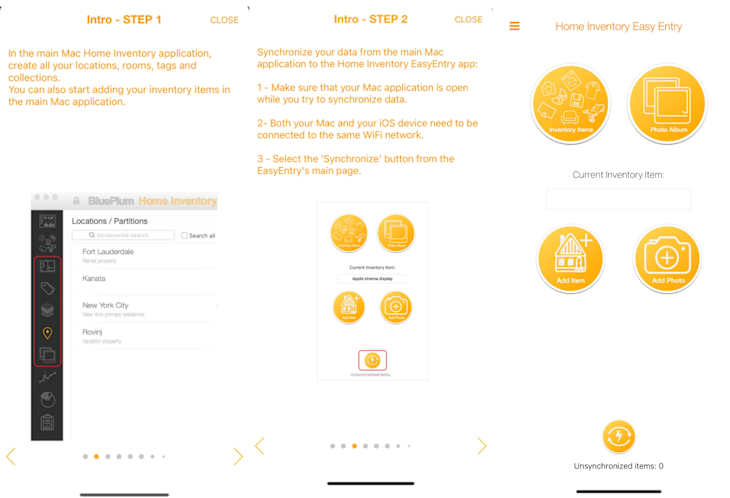
BluePlum Home Inventory is user-friendly and allows you to organize stuff by room, location, or collection. This app is ideal for travelers or for folks who split their time between multiple locations — the moving feature allows you to create multiple packing lists and assign insurance policies and claims to different items and locations.
This software requires you to download the Mac Home Inventory application on a Mac computer (it won’t work on Windows or other operating systems). There is an iOS associated app called “Home Inventory,” but it is designed to work in conjunction with the main Mac app. You start with the Mac-only application by creating locations, rooms, and tag collections (you can’t set this up on the mobile app). This information will then sync with the mobile app and allow you to add items and photos for each of the categories you created with your phone.

Skyware Inventory
Available: Online (it’s a website)
Cost: Free (with ads)
Overall thoughts: I might start here if I preferred to manage my home inventory on a desktop and didn’t mind not being able to take photos of my things with the convenience of an in-app camera.
One pro of Skyware inventory is that it’s highly trusted — more than 33,000 companies in 160 countries use Skyware Inventory to manage their inventories. You can use a free, ad-supported version of the app to create a home inventory and you can save manuals, receipts, and warranties on hundreds of items. The web-based software allows you to create a searchable database of your items, too. The biggest pro? There’s no limit to how many items you can upload. The biggest con? It’s not really an app — it’s a website.
Skyware Inventory is only available in a web browser and is set up to capture as much information about your needs at the front end with a questionnaire. You can upload images and documents, but it’s more of a manual process since there is no mobile app and no barcode scanner. It doesn’t surprise me that it’s a popular option for companies; it’s clean, minimal, and has the basic necessities of cataloging inventory. Because it focuses on things like quantity of stock items, and inbound and outbound items, it appears geared toward a retail business with transactions.

Itemtopia
Available: iOS and Android
Cost: Monthly subscription for $7.99; free version limits uploads to 20 items
Overall thoughts: It seems complicated to use at first and might be more than you need for basic home inventory, but it could be useful if you have a lot of belongings (in multiple locations) to keep track of.
Like Skyware Inventory, Itemtopia is a feature-rich home inventory app developed for businesses, with affordable options for individuals. The biggest pro for this app is that it’s fully customizable, and allows you to share your lists of items with others — like, say, your roommates. If you have extensive collections to inventory, such as baseball cards, stamps, or coin collections, Itemtopia might be the best bet. However, some reviewers, like one from the iOS store, said that the app is almost too customizable, so if you want something easy and straightforward, Itemtopia might not be the best choice.
Itemtopia is an inventory app with the perks of customization (you can organize by location, person and collection) and a share feature to share your inventory with other users. Initially, the app felt busy and complicated, but the dashboard includes video tutorials to quickly orient the new user. If you have more than one place to manage (home, office, storage space, etc.) and need to allow others access to your information, the robustness of this app might be what you’re looking for at a monthly subscription price of $7.99. The offerings of this app may exceed the needs of doing a basic home inventory, and the free version of this app only allows 20 items, so this may be most appropriate for someone looking for a comprehensive inventory solution.
Nest Egg
Available: iOS only
Cost: $4.99; the free version, called Nest Egg Lite, limits uploads to 25 items.
Overall thoughts: It’s super easy to use and and has helpful sorting features like categories and batch editing.
Not to be confused with the Nest home thermostat, Nest Egg is a simple-to-use scan home inventory system that recognizes millions of items. It’s available in 32 languages, including Chinese, German, French, and Spanish. You can scan up to 10 high-resolution photos per item.
One big pro of the app? It goes way beyond inventorying your valuable items for home insurance — you can inventory everyday items like your groceries, medicines, collectibles, and more. You can also add warranty information on your items to keep it in one safe place — no paper clutter necessary.
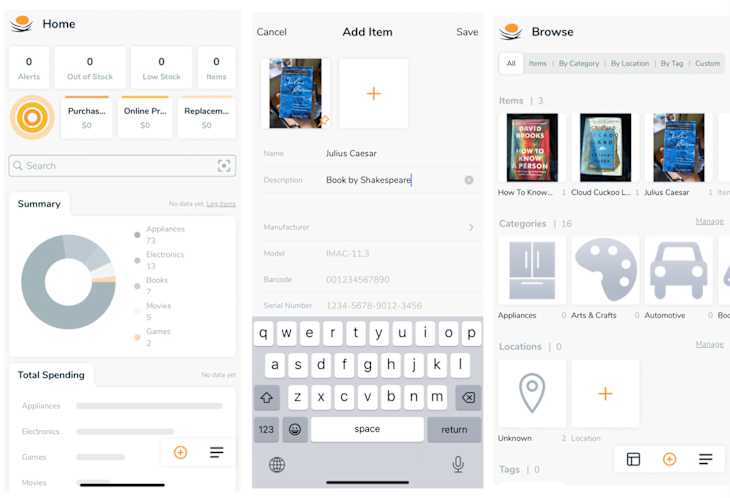
My favorite thing about this app is the way it sorts and filters its categories and subcategories. It makes it easy to search and find anything you are looking for, and while the existing categories (16) include anything from art to movies and documents, you can add more based on your needs. A great feature is this app is a batch editing tool that lets you reorganize multiple items at once. The dashboard also includes charts and graphs to help you organize and visualize your inventory, with features like total spending by category and recent purchases based on date. The paid version of this app is the most reasonable pricing of the apps I tried.

Sortly
Available: iOS and Android
Cost: $24 per month (500 uploads for two users); free version limits uploads to 100 items
Overall thoughts: Using this app came naturally to me, and you can scan barcodes to easily input items, which is great for things like books. Plus, you can import existing inventory lists.
Sortly was designed for small businesses to track their inventories, and the company offers a free version for individuals. The app is so functional, too. Sortly lets users create custom barcodes and QR labels, plus sort and filter inventory via custom lists. (Operate an inventory-rich small business from your home!) The upgraded monthly Advanced plan allows 2,000 entries, unlimited code label generation, and an integrated barcode scanner, but you have to pay for it.
I found Sortly to be the most intuitive to use out of the options I tried. It allows you to create folders to organize the categories of items, and then add items manually or by scanning a barcode. Since I was cataloging books, I found that I could scan the barcode and it would immediately pull in all the information for the book, including a picture of it, which was super convenient. The app has a Dashboard, which functions mostly as an inventory summary and a way to track transactions and item flow. Sortly also has an import option, so if you already had started a list in a .csv or .xlsx file, you’ll be able to bring it in and start managing your items in the app.
Honorable Mention: NAIC Home Inventory
The National Association of Insurance Commissioners’ home inventory app is neither as user-friendly nor dynamic as the others. But it has most of the same features, including scanning and categorized lists. Moreover, it gets the job done. Although NAIC is not in the software development business, the organization represents experts who know precisely what home inventory you need when processing a claim.
Check out the The New Mover to discover the latest tips and most innovative hacks to make your next move the smoothest one yet. This content was presented by a sponsor; it was created independently by our editorial team.